


Banuba SDK
3.35.00 Reviews
App Specs
- Version
- 1.2.6
- Updated On
- License
- Free
- Downloads
- 10,000+
- Developer
- Banuba
- Categories
- Libraries & Demo
- Platform
- Android
Screenshots




 Analysis by AppCompare
When I first looked at Banuba SDK, I found it easiest to think of it not as a ready-made social app, but as a developer tool for adding camera-based effects to another app. That distinction matters: the satisfying result is not simply opening it to browse filters, but understanding how its augmented-reality ideas could fit into a product you are building. If you are new to this kind of software, I would approach it as a learning and evaluation tool first, then decide whether its capabilities match a specific project.
What to expect from a camera-effects SDK
Banuba SDK is a free app in the Libraries & Demo category from Banuba. Its purpose is to show AI-oriented camera effects and give developers a sense of the kind of experience an SDK can bring to an app. The catalog lists an average rating of 3.3 from around 124 ratings, with over 10,000 installs. It is rated for Everyone, and the current version is 1.2.6. Those figures give a little context, but they do not tell you whether the SDK suits your project; the useful question is whether the effects you want can be made into a practical, dependable user flow.
For a first-time user, the most reassuring expectation is also the most important one: a demo can help you see and assess an effect, but a demo is not the same thing as a finished feature in your own product. I would use the app to get a concrete feel for the camera experience and to sharpen my requirements before committing to integration work. Decide what the user should be able to do, what a successful result looks like, and whether a visual effect genuinely helps that task rather than merely decorating it.
The SDK is aimed at people building apps, especially teams exploring face effects, virtual makeup, or background changes. If you are simply looking for a personal camera app to take and share edited photos, a regular camera or photo-editing app is likely a more direct choice. The difference is that a developer tool is valuable when you need to evaluate an effect as part of a product experience, not just apply it once to a picture.
Getting from installation to a useful first test
At the start, keep your goal small. Choose one effect you genuinely want to evaluate, open the demo, and test it in a few ordinary conditions rather than trying to judge every possibility at once. For example, if you are considering a face effect, check whether it stays aligned as you move naturally and whether its appearance is clear enough for the intended user. If you are thinking about a background effect, pay attention to whether the separation looks acceptable around hair and shoulders. These are practical checks, not promises about how the effect will behave on every device or in every room.
A useful first success is being able to explain, in plain language, what the effect adds and where it might fail. I would make a short checklist before experimenting: the user’s goal, the setting in which they will use the feature, and what visual imperfection would make the result distracting. That turns a quick demonstration into a small product test. It also prevents a common mistake: choosing an effect because it looks impressive in one moment, then discovering it does not suit the main job of the app.
One realistic example is a small beauty retailer considering a virtual makeup experience. A team member could use the demo to see whether an overlay feels intuitive and whether the idea is worth exploring before planning a larger feature. The next step would be to test the intended product flow in the actual app project, rather than assuming that a demo alone proves the finished experience will meet the retailer’s needs.
Worth Reading Before You Choose

Flipboard Shows What News Apps Must Do Beyond the Feed

Switching to Android Auto Means Rethinking Your Driving Routine

Google Calendar Makes a Crowded Week Easier to Manage

Ludo King Makes the Most of the Minutes Between Plans

Baby Panda World Brings Quick Play to Modern Phones, but Its Game Library Feels Busy

ESPN’s Live Game View Makes Following Close Games Easier
How to judge the effects beyond the first impression
A camera effect can look convincing in a still moment yet feel uncomfortable when someone turns their head, changes distance, or speaks. I would test those ordinary movements deliberately. With a face effect, look at the transition between a frontal view and a slight turn; with makeup, check whether the result still reads as makeup instead of an artificial mask. With background replacement, move against a busy background and notice whether edges remain distracting. This kind of evaluation is more useful than spending all your time comparing the most dramatic presets.
Lighting is another useful trade-off to explore. A bright, evenly lit room is a sensible starting point because it makes it easier to judge the effect itself. Then try the conditions your future users are likely to encounter, such as a room lit from one side or a dimmer indoor space. Do not treat a favorable demo moment as proof that every camera setup will behave identically. If an effect is central to your app, test it on the devices and in the circumstances that matter to your audience before promising a polished result.
There is also a product-design question that is easy to overlook: effects can add engagement while adding friction. A virtual try-on may help someone compare looks, but it can also distract from choosing a product if the controls are confusing. A background change might make a call more private-looking, but a rough outline can draw more attention than the original background. I would keep the user’s main task visible and ask whether the effect makes that task easier, more enjoyable, or more informative.
What can be confusing for a first-time user
The word “SDK” can lead people to expect a complete app-building toolkit inside the demo. I would separate three things: what the demo lets you see, what the underlying development kit may support, and what your own team would need to build around it. A demo is a way to inspect an example; it does not automatically create a finished feature, choose the right design, or solve the integration choices for you.
It is also worth distinguishing the app’s audience from the audience of the product you might build. The app is listed for Everyone, but that does not mean every possible camera feature will suit every audience or use case. A developer still needs to think about context, clarity, and whether an effect is appropriate for the people using the final app. In a retail setting, for instance, a realistic preview may be more useful than a playful filter; in a casual creative app, the opposite could be true.
Another point I would keep in mind is that a visual test is only one part of evaluating an SDK. Before building around it, a team should work through the technical and product requirements for its own project: how the feature will fit into the app, what the experience should be when the effect is not suitable, and how the team will test the result. That is not a reason to avoid the demo; it is a way to use it honestly, as an early decision aid rather than a shortcut around development.
Banuba SDK runs on Android with a minimum OS requirement of 8.0. If you are exploring it on a device that meets that requirement, start by checking that the experience is comfortable to use and that the effect you care about is easy to evaluate. If your work targets more than one platform, treat the Android demo as an initial look, not as a substitute for validating the experience on each platform you intend to support.
How it compares with ordinary camera and editing apps
Compared with a standard camera app, Banuba SDK is less about taking a picture quickly and more about demonstrating effects that developers could incorporate into another product. Compared with a general photo editor, it is not primarily a place to polish an image after capture. That makes it a better fit when you are exploring an interactive camera feature and a weaker fit when your immediate need is simply to add a filter to a finished photo.
It is also different from a full development environment. Developers should expect to do their project planning and implementation work in the tools appropriate to their app, using a demo to inform those decisions. If you already know exactly which camera effect you want and need an end-to-end production workflow, compare the SDK’s real integration requirements with other development options before settling on it. The right choice depends on your target experience, not on how entertaining a single demonstration looks.
For a first-time developer, a sensible path is to move from observation to a narrow prototype. First note what the demo does well and what feels awkward; then sketch the screen where that effect would live; finally, verify that the actual development route supports the experience you have in mind. This order avoids spending time building around an assumption that came from a brief visual test.
What is Banuba SDK All About?
First things first, the Banuba SDK is all about bringing augmented reality to your app with ease. It offers a plethora of features that let you integrate face filters, virtual try-ons, and even background swaps into your application. It’s like giving your app a dose of magic without needing a wand. Whether you’re building for Android or iOS, this SDK has got you covered.
Key Features You’ll Love
Let’s talk features. One of the standout aspects of Banuba SDK is its face tracking technology. It’s super precise and works like a charm even in low-light conditions. This means your users can enjoy seamless AR experiences without glitches or hiccups.
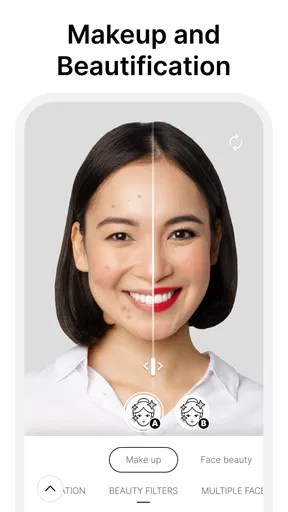
Another cool feature is the virtual makeup. If you’re in the beauty industry or just want to add a fun element to your app, this is a game-changer. Users can try on different makeup products virtually, making it a fun and interactive experience.
And then there’s the background removal. Imagine giving your users the ability to change their background during video calls or photos. It’s like having a green screen without the actual screen. Pretty neat, right?
Getting Started: Is It Developer-Friendly?
Now, you might be wondering how easy it is to get started. The good news is that the Banuba SDK is designed to be developer-friendly. They provide comprehensive documentation and a bunch of tutorials to help you hit the ground running. Even if you’re not a seasoned developer, you’ll find the support you need to integrate these features seamlessly.
Plus, the integration process is pretty straightforward. With just a few lines of code, you can start adding AR features to your app. It’s like adding sprinkles to your ice cream – quick and easy but makes a world of difference.
Performance and Compatibility
Performance-wise, Banuba doesn’t disappoint. The SDK is optimized to run smoothly on a wide range of devices. It’s compatible with both Android and iOS, which means you can reach a broader audience without worrying about performance issues.
Moreover, the SDK supports a variety of file formats and integrates well with popular development environments. This flexibility ensures that you can tailor the AR experiences to your app’s specific needs without breaking a sweat.
Why Banuba SDK Could Be a Game Changer
If you’re looking to enhance user engagement and bring something unique to your app, Banuba SDK is worth considering. The ability to add interactive AR features can significantly elevate the user experience, making your app stand out in a crowded market.
Not only does it offer a fun and engaging way for users to interact with your app, but it also opens up new opportunities for creativity and innovation. Imagine the possibilities of what you can create with a solid AR foundation!
Wrapping It Up
In summary, the Banuba SDK is a robust tool that simplifies the process of adding augmented reality features to your app. With its impressive face tracking, virtual makeup, and background removal capabilities, it’s a versatile option for developers looking to enhance their apps.
So, if you're ready to take your app to the next level with some cool AR features, give Banuba SDK a shot. It might just be the magic ingredient you’ve been looking for. Happy coding!
Pros
- Rich AR effects library enhances user engagement.
- Seamless integration with existing apps.
- Frequent updates with new features.
- Cross-platform support for both iOS and Android.
- Highly customizable to fit brand needs.
Cons
- Requires a subscription for full feature access.
- May increase app load times and size.
- Complex features require developer expertise.
- Limited offline functionality.
- High-quality AR may drain device battery.
FAQs for Banuba SDK
What is Banuba SDK and what can it do?
Banuba SDK is a sophisticated software development kit that provides advanced augmented reality (AR) capabilities for mobile apps. It allows developers to integrate features such as face tracking, AR masks, and filters into their applications, enhancing user engagement with interactive and immersive experiences. It's ideal for apps in the social media, entertainment, and marketing sectors.
Is Banuba SDK compatible with both Android and iOS platforms?
Yes, Banuba SDK is compatible with both Android and iOS platforms. This cross-platform compatibility ensures developers can create apps with consistent AR features across different devices. The SDK includes comprehensive documentation and support for integration into various project types, making it a versatile choice for mobile app development.
What are the system requirements for using Banuba SDK?
To use Banuba SDK effectively, developers need to ensure their development environment meets certain criteria. For Android, a minimum of Android 5.0 (Lollipop) is required, while iOS apps need to support iOS 11 or later. Additionally, a modern device with a decent camera and processor is recommended for optimal AR performance.
Does Banuba SDK offer support and updates?
Yes, Banuba provides regular updates to its SDK, ensuring it remains compatible with the latest mobile operating systems and devices. Additionally, Banuba offers comprehensive support to developers through documentation, tutorials, and a dedicated support team to assist with integration challenges or technical queries.
Are there any costs associated with using Banuba SDK?
Banuba SDK typically requires a licensing fee, which can vary based on the project's scope and the number of features implemented. Developers can reach out to Banuba for detailed pricing information and to discuss specific needs. It's important to evaluate the cost against the desired user experience enhancements the SDK offers.


